Thrifty Kiwi
Like our Facebook page
  • Home
  • Blog
  • Homesteading
  • Gardening
    • 2025 Garden
    • 2021 Garden Blog
    • 2019-2020 Garden Blog
    • 2017-2018 Garden Blog
    • 2016-2017 Garden Blog
    • Kiwi Urban Homestead 2013-2015 Garden Blog
    • Pest & Diseases
  • Recipes
    • Autoimmune Protocol
    • Meals and Snacks
    • Preserving
    • Household Cleaners
    • Health & Beauty
  • Skills
    • Menu Planning & Grocery Shopping
    • Money & Budgeting
    • Preserving How-Tos
    • Housekeeping
    • DIY
    • How to Find Stuff Free or Cheap
  • Animals
    • Critter Blog
  • About
  • Contact

Your Price Book (How to Beat the Supermarkets!)

30/1/2016

0 Comments

 
There are so many different brands/sizes/prices of nearly every product, not to mention so many stores to pick from! How is a thrifty shopper to know WHICH one is the best buy and when specials are really specials worth stocking up on? By developing and using your very own Price Book!

Picture
A price book is simply a place to record the prices from various sources on products you regularly buy, with dates and a break down per kg (or relevant size). This way you can see at a glance who usually has the cheapest price, what the price normally is, whether today's special is really that great and, over time, whether there is a seasonal pattern to when this item generally goes at a really good special price (that's when you'd plan to stock up!).

Bulk buying, or stocking up, can save you a ton of money over time. But if you don't do your research first, you won't know when to stock up on what for the best savings. Living payday to payday and think there is no way you can afford to bulk buy anything? Don't worry, I will show you how! If you read all the articles I post in THIS section of my website (and this one too), and begin to implement the ideas, in no time at all you WILL be able to afford to start building a store of supplies, and bulk shop to save maximum amounts!

But whether you bulk buy or not, it is invaluable to know the likely cost of an item, and where best to buy it. Apart from saving money, this also comes in handy if you wish to estimate the cost of buying everything on your shopping list prior to going shopping, so you can trim the list if needed before you head out the door (for more on this read my Master Grocery List article).

Here's how to create a price book:
1) Use either a half-size loose-leaf ring binder with alphabetical tabs, or an index notebook with multiple pages per letter.
2) Create headings under the relevant letter for items you regularly buy - in a looseleaf notebook this will probably be one item per page. In an index book, you will probably have 3 or so items per page, with lines ruled between.
3) Little by little over time, record the prices for these items from various sources. Be sure to date each entry, note the store name (use shorthand code such as CD for Countdown, NW for New World, and so on), brand, size of pack, and price. I mark the price with an * if it is on special.
4) To the right of each line, calculate the price in regular units, such as per kg for most food items, or per whatever is relevant to the item. That way when you're glancing at prices for an item, you're seeing the true comparison per unit. Make sure you identify what the break down is (eg Per kg, Per 100, Per unit etc)
That's it! It's not difficult, but it does take a little time. But this time will pay off big dividends and revolutionise your shopping! Take the price book with you when you go grocery shopping. If you're not sure a price is worth it, check your book. Don't be sucked in by the supermarket's careful arrangement of products, ranges, specials etc, all designed to get you to part with as much of your precious money as possible - beat them at their own game with a price book!
Below is an example of what might be recorded in your price book - in this case for whole raw almonds. Once you have an idea of prices, if you see a price at a different source that is clearly more expensive, there is no need to bother recording it, as you won't choose that location to buy this item. After you've gathered several prices for an item, you will only add to them if you see a good special on that item, or a new source with better prices. Note that the column headings are there for your benefit - I don't bother to put them in my actual price book, for the most part, except to indicate what unit the final breakdown is for. Remember an * indicates the item was on special when this price was recorded.

Almonds - whole, natural

Date
Store
Brand & Cost
Per Kg, GST incl
20/12/15
GM
Store brand 3kg $71.67 +GST
$27.47
20/12/15
GM
Store brand 1kg $23.01 + GST
$26.46
25/1/16
PS
Bulk Bins
$38.90
25/1/16
CD
Store brand 600g $19.99*
$33.32
Don't make yourself crazy over this! Just make a start with the items you buy most often. Look in supermarket flyers when you have a moment, and write down those prices. Each time you shop, add a few more. You'll soon have a very useful, fully functional price book. If you have already created a Master Grocery List, you will have a clear idea of what products you need prices for - there is no need to collect prices on items you never buy!

Remember, the purpose of your price book is:
1) To show you where the best places to buy particular items are
2) To help you judge when a special is really a good special
3) To help you see seasonal patterns to prices on some items, so you can plan ahead and know when to stock up
4) To provide a tool for you to estimate the cost of your grocery spending before you go shopping
5) To save you money!

Don't over-complicate it, or you won't use it.
Keep it simple and in a format that works for you, and you will have a very handy tool in your thrifty Kiwi arsenal!

0 Comments

Master Grocery List

25/1/2016

2 Comments

 
I'm sure you've heard the commonly given advice for grocery shopping:
* Never shop when hungry
* Always use a grocery list (and stick to it)

Good advice. After all, if you shop when hungry, the chances that unauthorized chocolate bars and nuts and oh, definitely items from the fragrant bakery department, will somehow dive into your grocery cart when you're not looking are very high, not to mention just buying more of things because you're hungry! And if you don't have a list, you will no doubt forget important things, and buy things you don't really need.

However, most people who DO use a list aren't very systematic. The list is probably more like a partial list, scribbled hastily on the back of a handy envelope. This is definitely better than no list at all, but usually still results in the shopper relying on spotting other things they need as they go around the store, and usually means spending more than intended, and/or buying unnecessary extras.

Let me introduce you to a better way....... the master grocery list!

A master grocery list is a complete shopping list which has everything you would normally purchase listed on it. I use this list to check what I need before shopping, and then modify it so I have a smaller list containing only the things I need to take with me. This way I don't miss anything. But the list has several other features that help me save money and plan well - it's a very thrifty tool! Let's go step-by-step through how to create a master grocery list, and then I will explain the additional features......
Picture
1) The very first step in creating your own master grocery list is to take an inventory of your pantry, fridge, freezers, bathroom & laundry cupboards and so on. I include food, cleaning supplies, animal food, toiletries and everything else I normally buy when grocery shopping. This list doesn't have to be fancy - just get everything written down in a readable format.

Picture
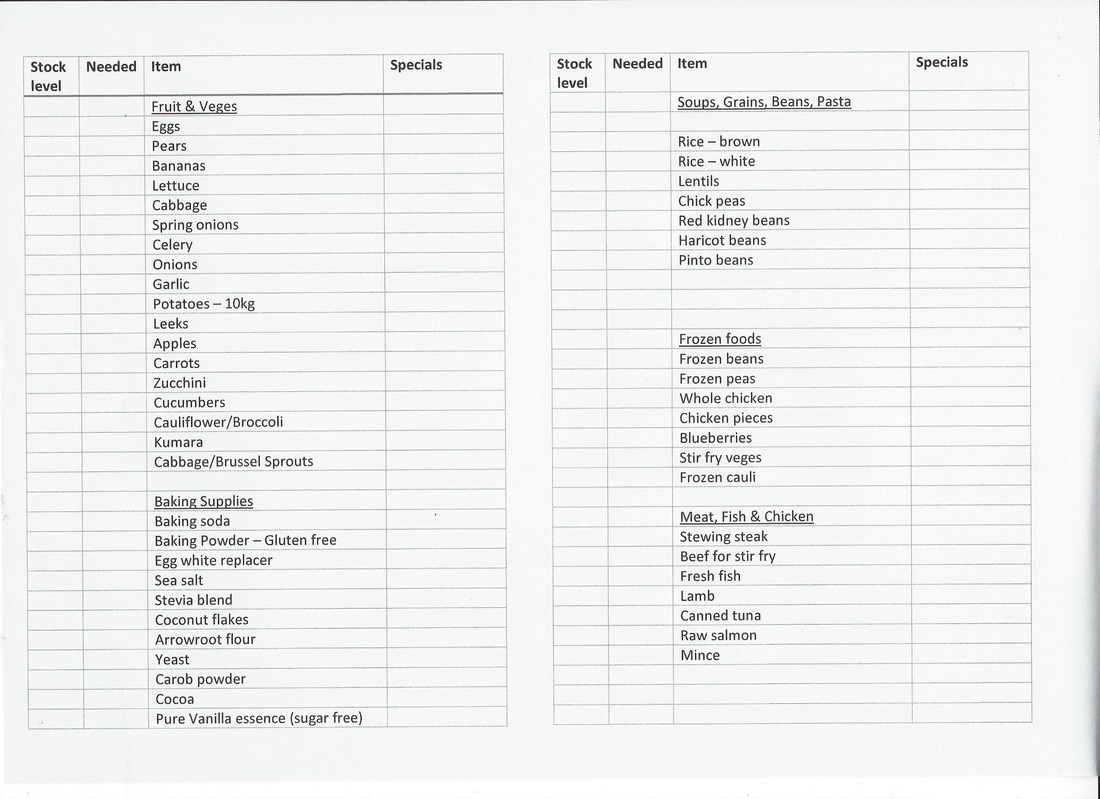
2) The second step is to create your master grocery list on the computer, making sure you save it in a location you can easily find it. I chose to set mine up in a Word file, with the page set to landscape, and setting the page up in two columns. This means when I print the list on A4 paper, I then cut it in half, stack the pages, and staple them together. I now have an easy to handle A5 size shopping list in my purse. In each column I set up tables in which there are several columns which I will explain more fully shortly. The main column has the items from my inventory listed, arranged in groups under headings by type. The groups are in roughly the same order as the layout of the main supermarket I visit, so I'm working through the list in order. Therefore fruit and veges are first, followed by baking supplies, and so on. Here's what the first page of my master grocery list looks like:

Picture
My master grocery list has 5 pages like this, with sections for fruit & veges, baking supplies, soups/grains/beans/pasta, frozen food, meat/fish/chicken, bathroom & laundry, pet supplies, first aid & cleaning supplies, dairy, bread/spreads & other, nuts/seeds & health foods, herbs & spices. In fact, since it could save you a lot of time, I'm going to share with you my master grocery list in Word HERE - you can download it, modify it, and use it as your own if you like.
Picture
3) The third step is actually using your master grocery list. You can either print a copy each time you're due to go shopping, and write on it, or keep a copy in sheet protectors and mark it up with a whiteboard pen. I go through all my supplies with list in hand, and cross out everything we already have plenty of, then mark next to those things we need the number or weight of items needed. Next, I go back to the computer, save a copy of the master grocery list under a separate file name (I call it "Groceries this week" and save over the top of that one each time), so that the master list remains intact, and then modify this newly saved file so that ONLY the items I need to purchase remain on it, with quantities added. Then I print this shorter list, cut and staple it, and I'm good to go.

Additional features:
You will notice that there are a couple of extra columns on the grocery list:

The Stock level column is one I used to have permanently filled out with the total number/weight of the item I liked to have on hand. So, for example, if I liked to make sure when I finished shopping there were 6 cans of tuna in the cupboard, 6 would be in the stock column next to canned tuna. When I look in the cupboard and find only 3 cans remaining, I would write 3 in the Needed column, as this is the number that would bring me back to my stock level. I use the stock level column more when I am working off set menus, as the number would be based on what needs to be on hand for those menus etc. This has another advantage - if I'm busy/sick/away, any member of the family can use the master grocery list, check off what is in the cupboards, and know how many more of a given item to buy - that way they won't miss anything important when they do the shopping for me, or if they're just helping me prepare the list, they can do that part on their own easily. I'm not using the stock level column much myself right now, as our diet changed so much recently I need to rethink things, but it really is very handy!

The Specials column is a feature that can save you a lot of money! Here's how I use it: after making my modified shopping list for the week, I browse through the flyers from places like Countdown and New World. If they have any items on my list at a good price, then I write in the specials column in code - eg N.W $2.99 next to butter would mean New World has butter on special for $2.99 each. I use CD for Countdown, PnS for Pack 'n Save, and so on. If I don't have paper copies of the flyers, they are easily accessed online, or I might grab them from the supermarkets themselves when I first get into town, and look them over before I start shopping. Now, when I actually go shopping, I work in a particular order:

First I stop by the farm store to buy bulk animals feeds. These are fine sitting in the van while I get everything else. Then I go to specialty stores for non-perishable items I know I will find cheapest there  - eg Asian market, Gilmours, bulk store etc.
Next, I go to Pack 'n Save, the supermarket which I generally find cheapest overall, for the rest of the groceries. However, as I go through each of these places, I check my list. If I get to Pack 'n Save and see their butter is $3.50 each, and I have NW $2.99 written down in the specials column, I know not to buy it at Pack 'n Save, but to make a stop at Countdown on the way home for butter and any other items that are at better prices there. If it turns out there is only a tiny savings to be made overall by a stop at Countdown, I might choose to go ahead and buy at Pack 'n Save and skip the extra stop. But if there are enough items/savings to make it worthwhile, or if I need to go there anyway for some things I can't get at Pack 'n Save, then I do so. Make sense? Finally on my way home I stop into the other supermarkets if there are savings to be made there, and lastly stop, if needed, at places like the vege market or butchers on the way home. I don't visit all of these places every time, usually, but according to our needs and best thrifty shopping at the time.

There is one more way that the master grocery list can make my life way easier and help me stick within budget - if money is really tight, and I know I absolutely must NOT go over budget with the shopping, after making my specific list, I will go through it and write next to each item it's approximate price. The prices are drawn from specials flyers, past experience, my Price Book (which I'll write another post about), or looking them up online. I can then total it all up and know with a reasonable degree of accuracy what the shopping will cost. If it's too much, I can choose now, at home, what to cross off the list. I leave the items crossed off visible, but with a line through. That way when I actually shop, if I beat the prices I listed and have some extra dollars left over, then I might choose which crossed off items are highest priority and be able to get some of them after all. This also motivates me to even more diligently look for the best priced items and brands in the store, so as to free up those few extra dollars.

When money is tight, it is much more comfortable and less stressful to go shopping, list in hand, and KNOW you will be able to afford the chosen items, and possibly even "win" by being able to get a few more, rather than going HOPING you can afford everything, and then being stressed about having to put things back when it's too much. That's how a thrifty kiwi rolls!
Picture
Another way to use the master grocery list - pin a copy up inside the pantry door. When anyone notices something has run out or is running low, they can circle that item on the list. If you are running to the store in between main shopping days for a few perishables, you can tell at a glance if there is anything else that might be urgent enough to pick up at the same time, if it can't wait until the next shopping day.

And just a couple more tips: In the past when I've had kids helping me shop, sometimes I have spilt the list up, giving some of the kids a page or section each, and their own trolley or basket, to run off and get those items and bring them back to me. Also, on my original master grocery list I was very specific about preferred brands, item size etc, so if someone else shopped for me, they knew EXACTLY what to get. And thirdly, when you have helpers, a set of walkie-talkies is fabulous - I could direct a given child to go to an aisle and get a couple of items. When they got there and compared prices, they could use the walkies to check in with me which brand I would prefer, given the prices, and then bring me back the right one. This saves time in not having to change things, and makes it fun for the kids too. With a couple of walkies and three kids helping, I could do shopping that would normally take me an hour alone in 15 mins flat! When kids bring things back to me, I would check them off my own shopping list as we transferred them to my trolley, so I would know everything was covered.

Note: when you first use a master grocery list, it might feel like it takes you a little longer. But stick with it. I find after a while of doing this, the list and what I need this week are so familiar, that by the time I've taken inventory and made my list, my brain knows exactly what is on it, and I can cruise through the supermarket very fast (skipping unnecessary aisles and not needing long to make decisions), and then just pull my list out near the end, check everything off, and maybe cruise back down an aisle on the way to the checkout for the one item I missed. A little preparation saves time!

Picture
To gain the maximum savings of time and money, use a Master Grocery List in conjunction with Menu Planning and a Price Book - each of which I will post about soon.

To sum up, using a master grocery list will make planning your shopping easier, save you money and time, and help you remember everything you need. It can take the stress out of sticking to a budget, and rescue you when you need other family members to help with inventory or shopping. I wouldn't do it any other way! Are you ready to start using your own Master Grocery List, and shop like a master?

2 Comments

    Categories

    All
    $50 Grocery Challenge
    Master Grocery List
    Menu Planning
    Price Book

    Archives

    March 2016
    February 2016
    January 2016

    RSS Feed

Powered by Create your own unique website with customizable templates.